World Clock: How to Check the Current Time in Any City
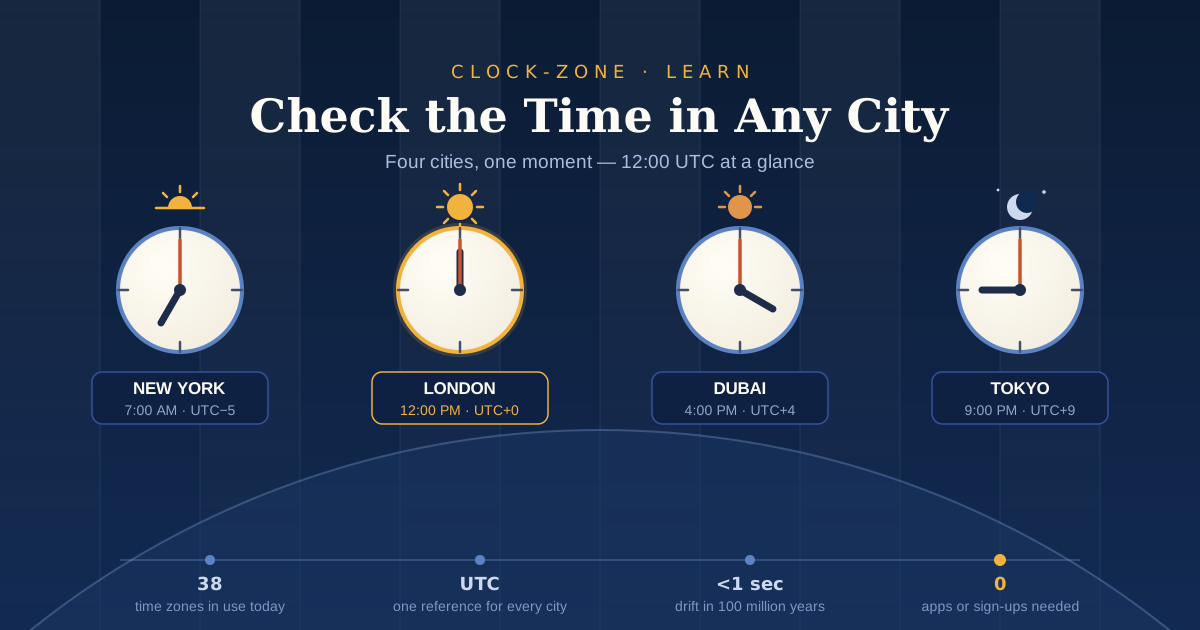
TL;DR: A world clock shows the live local time in cities around the world at a glance. To check the current time in any city, open a free browser-based world clock like Clock-Zone.com. You'll instantly see accurate local times for New York, London, Dubai, Tokyo, and more. No app, no account. This guide explains how world clocks work, why time zones get confusing, and how to use one for meetings, travel, and everyday life.
Ever sent a message to a colleague abroad, then realized it was 3 a.m. their time? A world clock solves that problem in seconds. It shows you the current time in any city, so you never have to guess again.
Here's why guessing fails so often. The world doesn't run on 24 neat time zones. It actually has 38 different time zones, thanks to countries that use 30-minute and 45-minute offsets. Add daylight saving time changes, and mental math becomes a trap.
This matters to more people than ever. Remote workers coordinate with teammates on other continents. Travelers plan layovers and hotel check-ins. Students attend online classes hosted overseas. Families stay in touch across oceans.
In this guide, you'll learn what a world clock is, how to check the exact time in any city for free, and how to avoid the classic time zone mistakes that ruin meetings and wake people up at midnight.
What Is a World Clock and How Does It Work?
A world clock is a tool that displays the live local time in multiple cities around the world at once. It works by taking one global reference time, called UTC, and applying each city's time zone offset to it. That's how it can show New York, London, and Tokyo correctly at the same moment.
UTC stands for Coordinated Universal Time. It's the official, internationally agreed standard for world time, calculated from a weighted average of more than 300 atomic clocks in over 60 laboratories. Every time zone on Earth is defined as an offset from UTC.
Here's a simple example. London in winter is UTC+0. New York is UTC-5, so it's five hours behind London. Dubai is UTC+4, so it's four hours ahead. A world clock does this math for every city automatically and updates it live.
The precision behind this system is remarkable. The definition of one second has been based on cesium atoms since 1967, not on the Earth's rotation. So when you glance at a good world clock, you're reading the output of a global scientific effort, not someone's wall clock.
How Do I Check the Current Time in Any City?
To check the current time in any city, open a free browser-based world clock such as Clock-Zone.com, then find your city on the page or open its dedicated city page. You'll see the live local time, date, and UTC offset instantly, with no download, registration, or payment required.
Here's the simple three-step process:
- Open the world clock. Go to Clock-Zone.com in any browser on your phone, tablet, or computer.
- Pick your city. View major cities side by side, or jump straight to a city page like current time in New York, current time in London, or current time in Dubai.
- Read the details. Each city shows the live time, today's date, and the UTC offset, so you know exactly where that city stands relative to yours.
We built Clock-Zone because checking the time in another city should take two seconds, not two minutes. No app stores, no sign-up forms, no subscriptions. Just open the page and the answer is there, on any device.
One practical tip: check the date as well as the time. When it's Monday evening in Los Angeles, it's already Tuesday morning in Sydney. Missing the date change is one of the most common scheduling mistakes people make.
Why Time Zones Make City Times Confusing
If time zones were simple, nobody would need a world clock. They're not simple.
Start with the count. Most people assume there are 24 time zones, one for each hour. In reality, half-hour and quarter-hour offsets push the total to 38 standard time zones worldwide. India runs on UTC+5:30. Nepal uses UTC+5:45, one of the most unusual offsets on Earth.
Then there's geography. Around 20 countries have more than one time zone, according to Pew Research Center. Russia has 11 contiguous zones, and the United States has 9. So "what time is it in the US?" has no single answer.
Daylight saving time makes things worse. Fewer than 40% of the world's countries use DST today, and more than 140 have tried it at some point, with about half abandoning it. That means the gap between two cities can change during the year. London and Dubai are 4 hours apart in winter but only 3 hours apart in summer.
The rules keep shifting, too. The European Parliament debated ending seasonal clock changes in October 2025, and several US states have passed laws waiting on federal approval. Memorizing offsets is a losing game because the offsets themselves keep changing.
A live world clock sidesteps all of this. It applies the current rules for every city, including DST, so the time you see is the time that's true right now.
World Clock vs Time Zone Converter: Which Tool Do You Need?
These two tools sound similar, but they answer different questions.
A world clock answers: "What time is it there right now?" Use it when you want a live view of one or more cities. It's perfect for a quick check before you call, message, or join a meeting.
A time zone converter answers: "When it's 3 p.m. my time, what time is it there?" Use the free time zone converter when you're planning something in the future, like scheduling next Tuesday's call or booking a flight arrival pickup.
A quick example makes the difference clear. If your teammate in Berlin says "let's talk now," glance at a world clock to see Berlin's current time. If she says "let's talk Thursday at 10 a.m. my time," run that through the converter to get your local equivalent.
Most people end up using both. Check live times daily with the world clock, and convert specific future times with the converter before you send any calendar invite. Together, they remove the guesswork completely.
How Accurate Are Online World Clocks?
Reliable online world clocks are accurate to within a fraction of a second for everyday use. They stay correct because global timekeeping is anchored to UTC, which is maintained by hundreds of atomic clocks worldwide, and because good clock websites sync against internet time services and apply daylight saving rules automatically.
The foundation is extraordinary. The newest US atomic clock, NIST-F4, is so precise that it would drift less than one second over 100 million years. That accuracy flows outward from national laboratories to the internet.
Distribution happens at massive scale. NIST's internet time service alone receives more than a million requests per second from devices syncing their clocks. Your phone, laptop, and browser all inherit their time from this system.
The other half of accuracy is rule-keeping. A trustworthy world clock updates automatically when a country enters or exits daylight saving time, or when a government changes its time zone. That's the part a paper chart or a memorized offset can never do for you.
How Do Remote Teams Schedule Meetings Across Time Zones?
Remote teams schedule across time zones by checking everyone's current local time side by side on a world clock, identifying the hours where workdays overlap, and then confirming the exact meeting time with a time zone converter before sending invites. This prevents the two classic failures: booking someone at midnight and missing a date change.
The problem is real and growing. The We Work Remotely State of Remote Work report found that time zone collaboration issues rank as the second biggest challenge for distributed teams, rising 3% year over year. And distributed work is the norm now: Gallup data shows 51% of remote-capable US employees work hybrid and 28% fully remote.
Here's a workflow that works:
- See everyone's day at once. Check the live time for each teammate's city on the world clock.
- Find the overlap. Look for hours that fall inside normal working time for everyone. For a New York, London, and Dubai team, that window is roughly 9 to 11 a.m. New York time.
- Measure the gap precisely. Use the free Time Calculator to work out exact time differences and durations, which helps when offsets aren't whole hours.
- Convert before you send. Double-check the final time in the converter so DST doesn't quietly shift your meeting.
One more habit helps: always state the time zone in your invite, like "14:00 UTC" or "9 a.m. ET". It gives everyone a fixed reference point if their calendar app misbehaves.
Everyday Ways to Use a World Clock
A world clock isn't just for business meetings. It quietly improves a lot of everyday situations.
Calling family abroad. Before you ring your parents or friends overseas, a two-second check saves them from a midnight phone buzz. It's a small courtesy that matters.
Travel planning. Check your destination's time before booking flights, airport pickups, or hotel check-ins. Landing at 6 a.m. local time feels very different from landing at 6 p.m.
Online classes and exams. Students taking courses hosted in another country can verify start times and set an online alarm clock in their browser so they never miss a session.
Global markets and events. Traders watch market opens in New York, London, and Tokyo. Sports fans and gamers track kickoff times and tournament starts in other regions.
Deadlines in another zone. If a submission closes at "23:59 Pacific Time," check the live Pacific time, then run a countdown timer so you can see exactly how long you have left.
Once checking world time takes two seconds, you start doing it before every international interaction. That's the habit that ends time zone mistakes for good.
Conclusion
Time zones are messier than they look: 38 zones, odd offsets, multiple zones in one country, and daylight saving rules that keep changing. You don't need to memorize any of it. A live world clock gives you the correct current time in any city instantly, and a converter handles future scheduling.
The takeaway is simple. Check live times on a world clock before you call or message anyone abroad. Convert future times before you send invites. State the time zone whenever you share a time.
Try it now on Clock-Zone.com. The World Clock, Time Zone Converter, Time Calculator, Alarm Clock, Countdown Timer, and Stopwatch are all free, work in any browser, and need no account. Bookmark the site, and share it with a colleague who keeps mixing up time zones. You'll both save time, in every sense.
Frequently Asked Questions
How can I check the current time in any city for free?
Open a free browser-based world clock like Clock-Zone.com on any device. You can view major cities side by side or open a dedicated city page, such as New York, to see the live time, date, and UTC offset. No app download or account is needed.
What does UTC mean on a world clock?
UTC stands for Coordinated Universal Time, the official world standard for time that replaced GMT as the reference in 1972. Every time zone is expressed as an offset from UTC, like UTC-5 for New York or UTC+4 for Dubai. A world clock uses these offsets to calculate each city's local time.
Why do some countries have time differences of 30 or 45 minutes?
Some countries chose offsets that better match their geography or history, which is why the world has 38 time zones instead of 24. India uses UTC+5:30, and Nepal uses UTC+5:45. A world clock handles these unusual offsets automatically, so you don't have to.
Does a world clock adjust for daylight saving time automatically?
A good online world clock adjusts for daylight saving time automatically. This matters because fewer than 40% of countries observe DST, so time gaps between cities change during the year. Live tools apply each region's current rules, which is safer than relying on memorized offsets.
Do I need to download an app or create an account to use a world clock?
No. Browser-based tools like Clock-Zone.com run directly on the web, so there's nothing to install and no registration. The World Clock, Time Zone Converter, Time Calculator, Alarm Clock, Countdown Timer, and Stopwatch all work instantly on desktop, tablet, and mobile.
Related Guides
- What Is UTC Time? — the reference point every city's offset is measured from.
- How to Convert Time Between Time Zones Without Mistakes — the 3-step method for scheduling across cities.
- Countries With Multiple Time Zones — why "the current time in France" isn't a single answer.