Best Free Online Timers in 2026
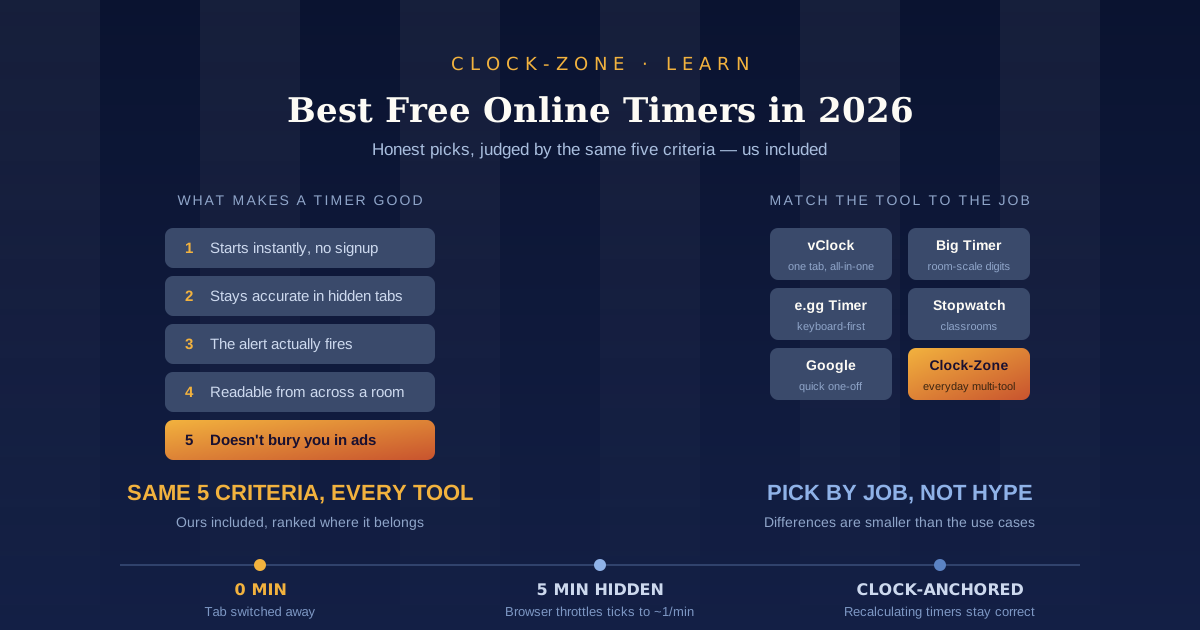
TL;DR: The best free online timer depends on the job. vClock suits an all-in-one tab, Big Timer suits a room full of people, e.gg Timer suits keyboard-first speed, Online-Stopwatch suits classrooms, and Google's widget suits a five second one-off. All are free without signup. The real difference between them is how they behave in a background tab.
Let's get the awkward part out of the way first. We make a timer. Clock-Zone is on this list, and you should factor that in when you read it.
So here's how we've tried to keep it honest. Every tool below is judged against the same five criteria, we've put ours in the middle of the list rather than at the top, and we've named the categories we lose. If you want a classroom countdown with a race-track theme, we don't have one and we'll tell you who does.
One more thing worth saying plainly: this compares what each tool documents and offers, not results from a lab. We haven't sat with a stopwatch measuring drift on six different sites. Where accuracy comes up, we've gone to the browser documentation that explains why timers behave the way they do, rather than making claims we can't back.
If you just need a countdown right now, the Clock-Zone countdown timer is one click away. If you want to pick properly, read on.
What Makes a Free Online Timer Actually Good?
Five things, roughly in order of how often they're the reason a timer annoys you: it starts instantly with no signup, it keeps accurate time when the tab is hidden, its alert actually fires, its display is readable from a distance, and it doesn't bury you in ads. Most free timers pass the first test and fail at least one of the rest.
The second criterion is the one that separates tools that feel reliable from tools that quietly lose a minute while you're in another tab. It's also the one nobody advertises, because the honest answer involves explaining a browser behaviour that makes every timer look slightly worse. We've given it its own section below.
The fourth one matters more than it sounds. A timer you're watching yourself can be small. A timer that a class of thirty or a room of workshop attendees needs to read has to be enormous, and most timer sites are designed for the first case.
The Best Free Online Timers, Compared
| Tool | Signup | Ads | Standout feature | Best for |
|---|---|---|---|---|
| vClock | No | Yes | Bookmarkable preset URLs | One tab for everything |
| Online-Stopwatch | No | Heavy, paid removal | Themed classroom timers | Teachers |
| e.gg Timer | No | Light | The URL is the interface | Keyboard-first users |
| Big Timer | No | None | Room-scale digits | Workshops and talks |
| Google Search | No | None | Zero friction start | Quick one-offs |
| Pomofocus | No | Light | Built-in 25/5/15 cycles | Focus sessions |
| Clock-Zone | No | None | Five tools, no ads, 15 languages | Everyday multi-tool |
vClock: best all-in-one tab
vClock bundles a countdown, alarm clock, stopwatch and world clock into one site. Its neatest trick is that timer settings live in the URL, so you can bookmark a configured countdown and it opens ready to go. It also carries holiday countdown presets if you want to count down to a date rather than a duration. It's ad-supported, which is the trade.
Worth knowing: several sites use the vClock name across different domains, with different feature lists on each. The link above is the original.
Online-Stopwatch: best for classrooms
Online-Stopwatch is one of the oldest timer sites on the web and it has leaned hard into personality. You get race-track countdowns, sensory timers with no numbers at all, exam clocks, plus random name pickers and group generators. None of that matters on a work laptop. All of it matters when you're trying to hold the attention of a room of eight-year-olds.
The catch is heavy advertising, with a paid tier to remove it. In a classroom that trade is usually worth making. This is a category we don't compete in, and if teaching is your use case this is probably your answer.
e.gg Timer: best for keyboard-first speed
e.gg Timer has the best party trick in the category. Type e.ggtimer.com/10minutes into your address bar and the countdown is already running by the time the page appears. No clicking, no configuring. Any duration becomes a bookmark.
Everything else about it is deliberately bare. Minimal display, basic sound, nothing to adjust. That's the point.
Big Timer: best for a room
Big Timer does exactly one thing: an enormous full-screen countdown that scales to fill your display, with no ads. It's built for workshops, presentations and meetings, and it's the right pick whenever the timer is for an audience rather than for you. Browser timers like this one also work with any screen sharing tool, so a countdown shared over Zoom, Teams or Meet keeps a distributed workshop on schedule the same way it would in a room.
Google Search timer: best for a quick one-off
Type "set a timer for 10 minutes" into Google and a widget appears above the results, already counting. Google has offered this since 2013, and it toggles between timer and stopwatch with a fullscreen option built in.
It's the fastest possible start and there are no ads. It's also the most fragile option here. It lives and dies with that search tab, and it isn't a product Google supports the way it supports a real app. The timer disappeared from Search entirely for several weeks in 2022 before returning. Fine for boiling pasta. Not something to build a routine on.
Pomofocus: best for focus sessions
Pomofocus runs standard Pomodoro cycles, 25 minutes of work, 5 minutes of break, 15 after four rounds, with no account needed. If your goal is structured focus rather than a raw countdown, a purpose-built Pomodoro tool beats a generic timer because the break cycle is automatic.
It's not the only free option. Marinara Timer is arguably the more flexible free pick since it has no premium tier at all and lets you set any interval, while Pomofocus wins on how fast it starts. If you want the full method behind the numbers, our guide to the Pomodoro Technique covers the six official steps and what the research supports.
Clock-Zone: best for an everyday multi-tool
Ours. Five tools on one page (clock, alarm, countdown timer, stopwatch and world clock), no ads, no account, and it works in 15 languages. We also publish an embeddable clock widget if you want a live clock on your own site, which none of the tools above offer.
The honest limitation: our alarms and timers ring in the browser tab, so the page has to stay open. That's true of nearly every tool on this list, and any site telling you otherwise is worth a second look.
Why Do Online Timers Drift in Background Tabs?
Browsers deliberately slow down timers in hidden tabs to save battery and CPU. A countdown that works by counting its own ticks falls behind as soon as you switch away, sometimes badly. A countdown that reads the system clock and recalculates stays correct no matter how hard the browser throttles it.
This isn't folklore. It's documented behaviour. Chrome applies escalating tiers of throttling depending on how long a page has been hidden, and in its most aggressive tier, which kicks in once a page has been invisible for five minutes and its timers are deeply chained, those timers may only be checked around once per minute. Firefox clamps timers in inactive tabs too, and in some background cases enforces a minimum of ten seconds.
So a naive countdown, sitting in a tab you left twenty minutes ago, may have received a fraction of the ticks it was expecting. Developers work around this by moving the timing logic into a Web Worker or by anchoring to real timestamps rather than trusting the tick count.
Two practical takeaways. First, this is why almost every timer site tells you to keep the tab open, and why that instruction is honest rather than lazy. Second, if the alert absolutely has to fire, don't rely on a background browser tab at all. Use your phone.
Which Free Timer Should You Use?
Match the tool to the job. Online-Stopwatch for classrooms, Big Timer for workshops and talks, e.gg Timer for instant keyboard starts, Pomofocus for structured focus sessions, Google for a one-off you'll forget about in ten minutes, and Clock-Zone when you want a clean multi-tool with no ads.
Some more specific cases:
Cooking
Any timer works, but the timings matter more than the tool. Our guide to how long to boil an egg covers why the same chart gives different results in different kitchens, which is a bigger source of error than your choice of countdown.
Workout intervals
A countdown is the wrong shape for interval training, because you need splits rather than a single end point. An online stopwatch with lap times fits sprint repeats and circuits better than any countdown will.
Classrooms and presentations
Readability beats features. Big Timer for a workshop, Online-Stopwatch for younger students, or a full-screen online clock on a spare monitor when you want the time rather than a countdown.
Waking up or a fixed appointment
You want an alarm, not a timer. A countdown measures a duration from now; an online alarm clock fires at a specific clock time. People reach for the wrong one constantly.
Are Free Online Timers Really Free?
There are three kinds of free here. Genuinely free with no ads and no account (Big Timer, Google's widget, Clock-Zone). Free but ad-supported, where your attention is the payment (vClock, Online-Stopwatch, which also sells an ad-free tier). And free tier with a paywall above it, which is common once you move into dedicated focus apps.
That third category is where "free" gets slippery. Forest, for instance, costs $3.99 on iOS while the Android version is free with ads, so the same tool sits in different categories depending on your phone. Browser tools tend to be more straightforward: Pomofocus needs no account at all, and what you see on load is what you get.
The other cost is data. A timer has no legitimate reason to need an account, so treat a signup wall as a signal about what the site is actually collecting.
Browser Timer or Phone Timer?
The honest answer is that they're good at different things, and anyone selling you a browser timer (us included) should say so.
Your phone wins when the alert has to reach you. Lock-screen notifications, sound that cuts through, an alarm that works whether or not a screen is on. If you're going to walk away from the desk, use the phone.
The browser wins on access and proximity. Nothing to install, works on a library machine or a borrowed laptop, and it lives in the same window as the work you're timing. If your day already happens in a browser, a pinned timer tab has less friction than picking up a phone, which comes with its own distractions attached.
How We Picked These
Same five criteria for every tool: instant start, no signup, background behaviour, alert reliability, readability and ad load. We included our own timer under those criteria and placed it where it belongs rather than at the top.
Two limitations worth stating. This compares documented features rather than hands-on stopwatch testing, so treat the accuracy discussion as an explanation of why timers drift rather than a measurement of which one drifts least. And roundups rot: tools get abandoned, and at least one timer that appeared in competing lists is now a parked domain. We recheck this page and update the date when we do.
Conclusion
Three things to take away. The differences between free timers are smaller than the differences between use cases, so pick by job rather than by feature count. Background tab throttling is real, documented browser behaviour, so keep the tab open or use your phone when the alert genuinely matters. And free means three different things, so check whether you're paying with attention, data or nothing at all.
The best timer is the one you'll actually open. If you want ours, the Clock-Zone countdown timer is free, ad-free and needs no account. Bookmark all of Clock-Zone's time tools and you'll have a timer, alarm, stopwatch and world clock one tab away.
Frequently Asked Questions
What is the most accurate free online timer?
Any timer that reads the system clock and recalculates remaining time when you return to the tab, rather than counting its own ticks. Browsers throttle timers in hidden tabs on purpose, so a tick-counting countdown falls behind while a clock-anchored one stays correct. Most timer sites don't publish which approach they use.
Do online timers keep running when you switch tabs?
The page keeps running, but the browser slows its timers down. Chrome can check timers roughly once a minute once a page has been hidden for five minutes, and Firefox clamps inactive tabs as well. Well-built timers survive this by recalculating from the clock. Keep the tab open either way, since the alert needs the page alive to fire.
Is there a free online timer with no ads and no signup?
Yes. Big Timer, Google's Search widget and Clock-Zone all run without ads or accounts. vClock and Online-Stopwatch are free but ad-supported, and Online-Stopwatch sells a paid tier to remove them.
What is the best free timer for a classroom?
Online-Stopwatch, for its themed countdowns, sensory timers without numbers, exam clocks and random name pickers. It's ad-heavy, but the visuals hold children's attention in a way a plain countdown doesn't. For older students or a workshop, Big Timer's full-screen digits are easier to read from the back.
Can I use a free online timer on my phone?
Yes. Every tool listed here runs in a mobile browser with no app install. Keep the tab open and the screen from locking, because a browser timer can't reach your lock screen the way a native phone alarm can. If the alert has to wake you, use your phone's built-in clock app instead.
Related Guides
- Study Timer: How to Use One and How Long — how long a block should actually be, and five methods worth trying.
- Egg Timer: Perfect Boiled Eggs Every Time — exact boil times, and why the same chart gives different results in different kitchens.
- The Pomodoro Technique Explained — the six official steps behind the 25/5 cycle several tools on this list automate.